
表单里面单选框和复选框可以说是一点也不好看,随着css3的越来越流行,往上也有了很多漂亮的写法,这里是从网上的方法中整理出来的,直接拿来用就可以了,可能在实际运用当中,需要做一些微调。下面直接放代码吧
<!doctype html>
<html>
<head>
<meta charset="utf-8">
<title>漂亮的单选框和复选框样式 - UI世界</title>
<style>
body { padding: 50px; font-family: "微软雅黑"; font-size: 14px;}
a:hover { text-decoration: none;}
.ui-checkbox
{
    position:relative;
    width: 100%;
}
.ui-checkbox input[type=checkbox] { display: none;}
.ui-checkbox span{
     cursor: pointer;
}

.ui-checkbox input[type=checkbox]+span:before
{
    content: "";
    width: 18px;
    height: 18px;
    display: inline-block;
    vertical-align: middle;
    margin-top: -3px;
    background-color: transparent;
    border-radius: 2px;
    background-color: #e3e3e3;
}

.ui-checkbox input[type=checkbox]:checked+span:before
{
    background-color: #3aab4e;
}

.ui-checkbox input[type=checkbox]:checked+span:after
{
    font-size: 12px;
    content: '✔';
    width: 10px;
    height: 10px;
    position: absolute;
    top: 1px;
    left: 4px;
    color: #FFF;
    display: block;
}

.ui-checkbox input[type=checkbox]:disabled:checked+span:before
{
    opacity: .65;
    background-color: #e3e3e3;
    border: 1px solid #e3e3e3;
}

.ui-radio { display: inline-block; vertical-align: middle;}
.ui-radio input[type=radio] { display: none;}
.ui-radio label[for] { cursor: pointer; margin-top: -3px;}
.ui-radio input[type=radio]:checked+.radio-label .radio:before {
    content: " ";
    position: absolute;
    display: inline-block;
    width: 6px;
    height: 6px;
    background: #fff;
    top: 5px;
    left: 5px;
    border-radius: 50%;
}
.ui-radio .radio-label .radio {
    position: relative;
    display: inline-block;
    width: 16px;
    height: 16px;
    border: 2px solid #e3e3e3;
    border-radius: 50%;
    vertical-align: middle;
}
.ui-radio input[type=radio]:checked+.radio-label .radio {
    border-color: #3aab4e;
    background-color: #3aab4e;
}

.form-item,
.dream-label { margin-bottom: 10px;}
</style>
</head>

<body>
<form action="#" method="post" target="_top">
  <div class="form-item">
    <div class="dream-label">您最喜欢的球类运动:</div>
    <div class="dream-controls">
      <label class="ui-checkbox"><input type="checkbox" name="ids[]" value="1"><span> 篮球</span></label>
      <label class="ui-checkbox"><input type="checkbox" name="ids[]" value="2"><span> 足球</span></label>
      <label class="ui-checkbox"><input type="checkbox" name="ids[]" value="3"><span> 排球</span></label>
    </div>
  </div>
  <div class="form-item">
    <div class="dream-label">你要生成的sql语句:</div>
    <div class="dream-controls">
      <div class="ui-radio">
        <input type="radio" name="type" id="isInsert" value="1" />
        <span class="radio-label">
          <label class="radio" for="isInsert"></label>
          <label for="isInsert">插入语句</label>
        </span>
        <input type="radio" name="type" id="isUpdate" value="0" />
        <span class="radio-label">
          <label class="radio" for="isUpdate"></label>
          <label for="isUpdate">更新语句</label>
        </span>
      </div>
    </div>
  </div>
</form>
</body>
</html>
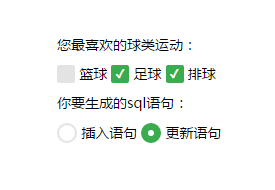
效果如图:
转摘文章请标明来源:http://www.uishijie.com/article/24.html